AI-enriched loyalty insights with the Memberson MCP Server

Connect your AI assistant — Claude, ChatGPT, Gemini, Cursor or any other MCP-compatible client — to your Memberson loyalty data with the Memberson MCP Server. Once connected, ask natural-language questions about your loyalty program and get instant AI-enriched insights back, without writing SQL or waiting for a BI team to build a report.

Examples of benefits:

  • Faster decision making: Marketing, loyalty and finance teams get instant answers instead of waiting for reports
  • Self-service insights: Non-technical users can explore the data without writing SQL or building dashboards
  • Deeper data enrichment: AI can combine your loyalty data with external context like weather, traffic and competitor activity to surface patterns you would not otherwise see
  • Reuses existing access control: Uses your CRM login and role permissions — no new password store, no new permission model

Concept

Connect your AI assistant — Claude, ChatGPT, Gemini, Cursor or any other MCP-compatible client — to your Memberson loyalty data with the Memberson MCP Server. Once connected, you can ask natural-language questions about your loyalty program and get instant AI-enriched insights back, without writing SQL or waiting for a BI team to build a report.

Execution Overview

  1. Get Memberson MCP Server URL and credentials and add Loyalty Connector to your AI assistant
  2. Set up MCP to the CRM roles, each user connects with their own CRM credentials
  3. Ask questions in natural language and get instant loyalty insights
  4. Enrich your loyalty insights via third-party data

KPI

  • Time to answer ad-hoc loyalty questions reduced > 80% [from days to minutes]
  • Increase in self-service insight usage by marketing and loyalty teams > 50%
  • Cost of MCP Server setup and CRM role configuration (one-time, low)

Detailed Execution Plan (Steps)

This is a typical setup for Claude.ai. The same pattern works for ChatGPT, Gemini, Cursor and any other MCP-compatible AI assistant — only the UI labels differ. Most steps below are done once per organisation. The actual question-and-answer happens in your AI assistant chat window.

#1

Get Memberson MCP Server URL and credentials and add Loyalty Connector to your AI assistant

Contact your Memberson account team and request access to the MCP Server. You will receive the Memberson Server URL and credentials.

Add the Memberson Loyalty connector to your AI assistant. This is a one-time setup.

Set up MCP to the CRM roles, each user connects with their own CRM credentials

The MCP Server reuses your existing CRM access control. A user can only use MCP tools if their CRM role has the relevant MCP task codes. This is done once per role by a CRM administrator.

Each user connects with their own CRM credentials. Once the connector is added at the organisation level and the CRM roles are configured, each user does a quick one-time connect for their own account. There is no new password to remember — the MCP Server reuses the user's CRM login.

Ask questions in natural language and get instant insights

Once connected, just type your question into the AI assistant chat. The AI will translate it into a safe, read-only BI query against your loyalty data and give you the answer in seconds.

A good first question to try is: "Show me the sample BI Prompts from Memberson Loyalty." The AI will return a curated list of starter prompts you can copy and adapt. From there, just ask your own questions.
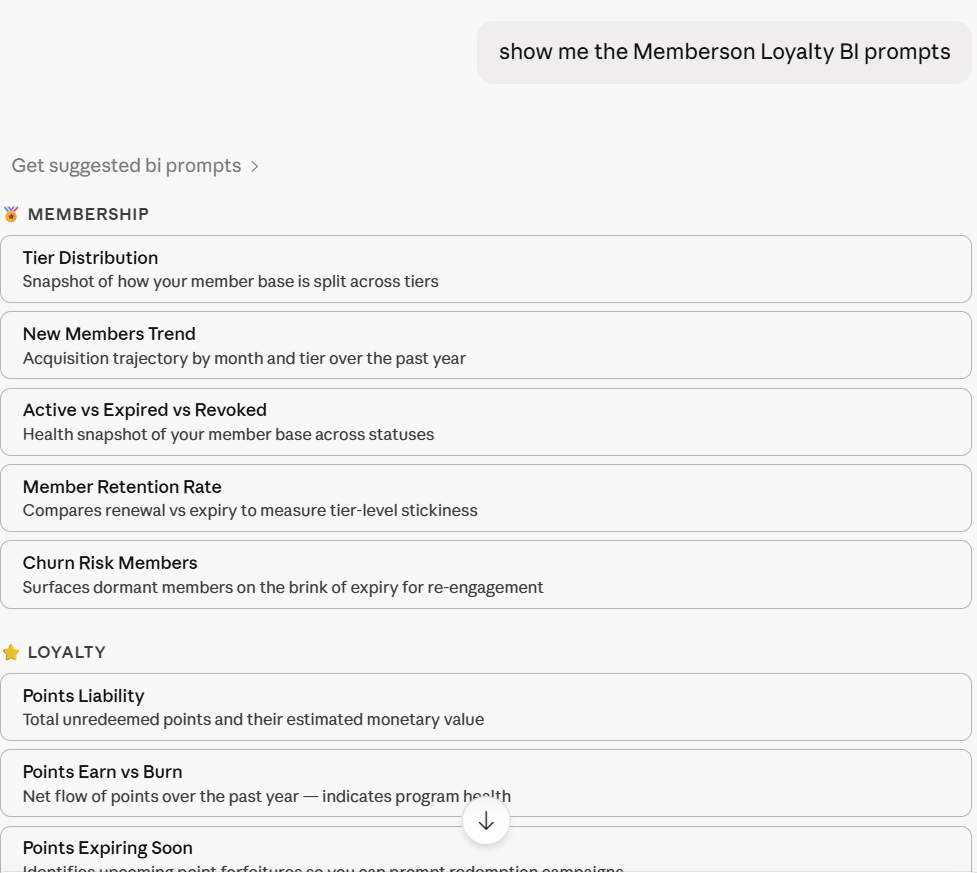
Below are example prompts you can run today.

  • "Identify members whose membership expires in the next 30 days and who haven't transacted in the last 90 days."
  • "Calculate retention rate by comparing renewed vs expired memberships over the past 12 months. Show by tier."
  • "What is our total outstanding points liability? Show the total unredeemed points and their estimated monetary value."
  • "How many points are scheduled to expire in the next 90 days? Show by member tier."
Tips for getting good answers

The suggested BI prompts are just starting points. You can ask anything about your loyalty data, but the clearer your question, the better the answer. A few things that help:

  • Specify the time range ("in Q1 2026" instead of "recently")
  • Name the tier, location or segment ("Preferred members at TTP" instead of "top customers")
  • State the metric explicitly ("total spend" vs "average spend" vs "transaction count")
  • Say what you want grouped or sorted by ("by month, sorted by revenue descending")

If your question is ambiguous, the AI will ask a clarifying question before running anything. But it is faster to be precise upfront.

NOTE: The AI cannot change CRM data, run write operations, or look up individual members by name (BI data is anonymized). If you ask for something the BI schema does not expose, the AI will tell you rather than guess.

Enrich your loyalty insights via third-party data

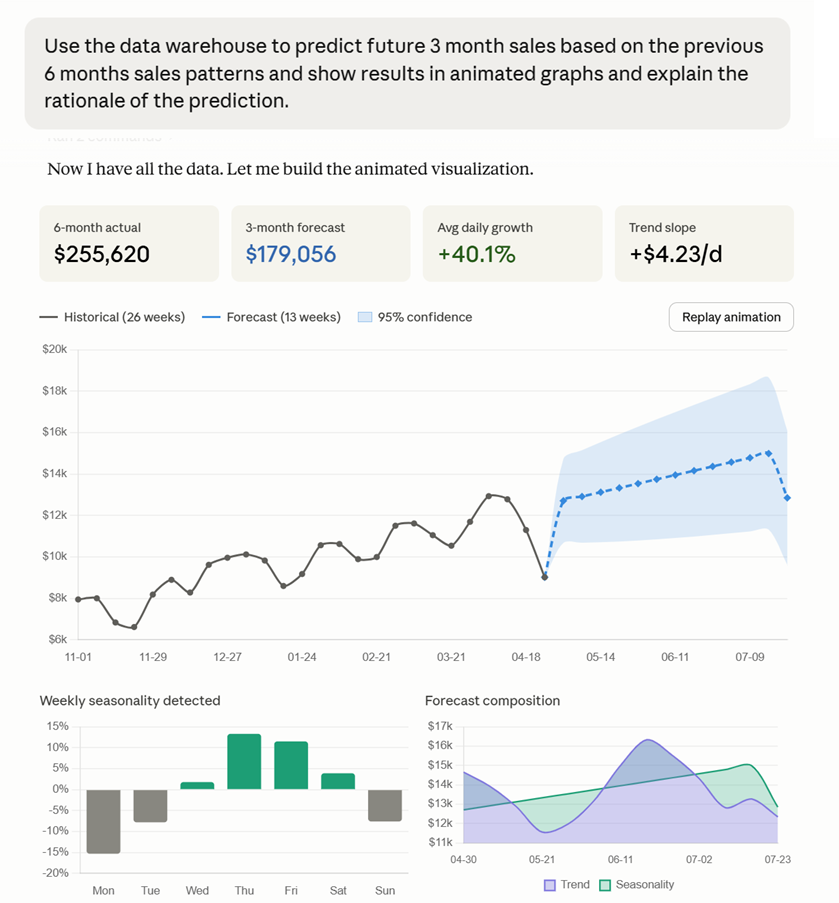
You can ask the AI to connect to third-party data it has available and dive deeper into the loyalty insights. This data may be public data that is available, or you may have connected other internal data sets via MCPs that it can cross-reference. This is where AI really starts to add value beyond a normal BI report.

For third-party external context data you can try areas such as weather, traffic and competitor activity, and tell you what it sees. Example prompts you can try:

  • "Analyse if any particular product sells more or less depending on the weather at the time of the sale."
  • "Analyse if traffic near my stores seems to affect sales. Over the last 12 months, per store, look at traffic situation at 3pm in the day and see if there is any relation to the sales."
  • "Identify key competitors and if they are running any particular large promotion campaign which may impact my sales."

Loyalty Best Practices

Our Loyalty Best Practices consist of executable loyalty practices to drive specific KPIs of the loyalty program. The loyalty best practice database contains many different types of practices that you can use to deliver the right results for you. Please let us know if you are interested in receiving information about other loyalty best practices or have a more in-depth discussion on how the above loyalty best practice can be utilized in your organisation.

Thank you! Your submission has been received!
Oops! Something went wrong while submitting the form.