
Partner Rewards: More Member Value, Lower Point Cost
Description
Collaborating with partners brings benefits to you, your members and the partners. Your members can redeem partner events, products and rewards to enjoy additional and interesting experience, while you lower the cost of your loyalty program.
Examples of benefits:
- Customer Experiences: Bring a new set of experiences and rewards to your members with the right partner that supplements your offering
- Lower Point Cost / Liability: Typically you will give your partner a new way to attract customers while you can lower your point cost / liability since members are redeeming rewards from the partner.
It is important that both the business application, to ensure the right partner is used with the right rewards and products, and the technical implementation, for seamless execution via a standard approach that can be configured for multiple partners in your product, is done right. Memberson can help you navigate both the business application and technical implementation of partner collaboration via promo codes.
Concept
Let your customers redeem partner events, products and rewards via your loyalty mobile app or e-commerce site that can be used in your partners stores, sites or mobile app.
Execution Overview
- Receive Third Party One Time Codes
- Upload the Partner Promo Codes as outbound OTC in your CRM
- Set up Voucher with External Reference Code (OTC List) linked to Outbound OTC in CRM
- When the voucher is redeemed / given show promo on voucher in Mobile App (options plain text or QR code) - various utilization options available
- Member enters Promo Code in partner sites / mobile app to claim event, product or rebate
KPI
- Partner rewards are typically free since it drives new customer to their business
- Reduction in point liability and added benefits / experience to your members
Detailed Execution in Memberson Loyalty CRM Platform
This is a typical implementation process but there are many various configuration options available depending on how the promo codes are shared with the users and how they are suppose to use them with the partner.
#1 Receive Third Party OTC
The Marketing / CRM department negotiate with a partner and come to an agreement that they will receive a set of OTC that they can share with their members. If you have a well-known brands, this often is a matter of choosing the right one, for other brands you are giving access to your customer base so you have a very strong value proposition when approaching the right set of partners. We can provide further insights on how to select the right partner.
Typically the third party will send an encrypted file to the marketing / CRM department with a set of one-time codes that can be used on their platform. This typically comes in csv / excel /txt format as below:

#2 Upload the Promo Codes as outbound OTC in CRM
Go to One-Time Code in Admin and select the tab OUTBOUND CODES and press Upload Outbound OTC (top right corner)

Define the Master Code and List Code that you want to use and then select the List with one time codes to be uploaded and press OK. You can see from the list how many of the one time codes has been used once they are started to be redeemed.

NOTE: There are different options in giving the member the partner promo code, such as:
1. A certain activity by the member that triggers vouchers via Reaktor rule
2. Use segmentation in Engage and issue out voucher via Engage
3. Member redeeming a voucher to receive the partner promo code.
For the next 2 steps we will assume that the member is redeeming a voucher via the Mobile App to access the partner promo code.
#3 - Set up the Voucher to connect to third party codes (admin => Vouchers)
- Fill in the Sub Type = Partner (third party voucher) and link the external outbound codes via the field “External Ref Code (OTC List)” by selecting the correct Master Code that you had defined
- Ensure that the Stock is that same amount of OTC that you have uploaded (in this example 6)
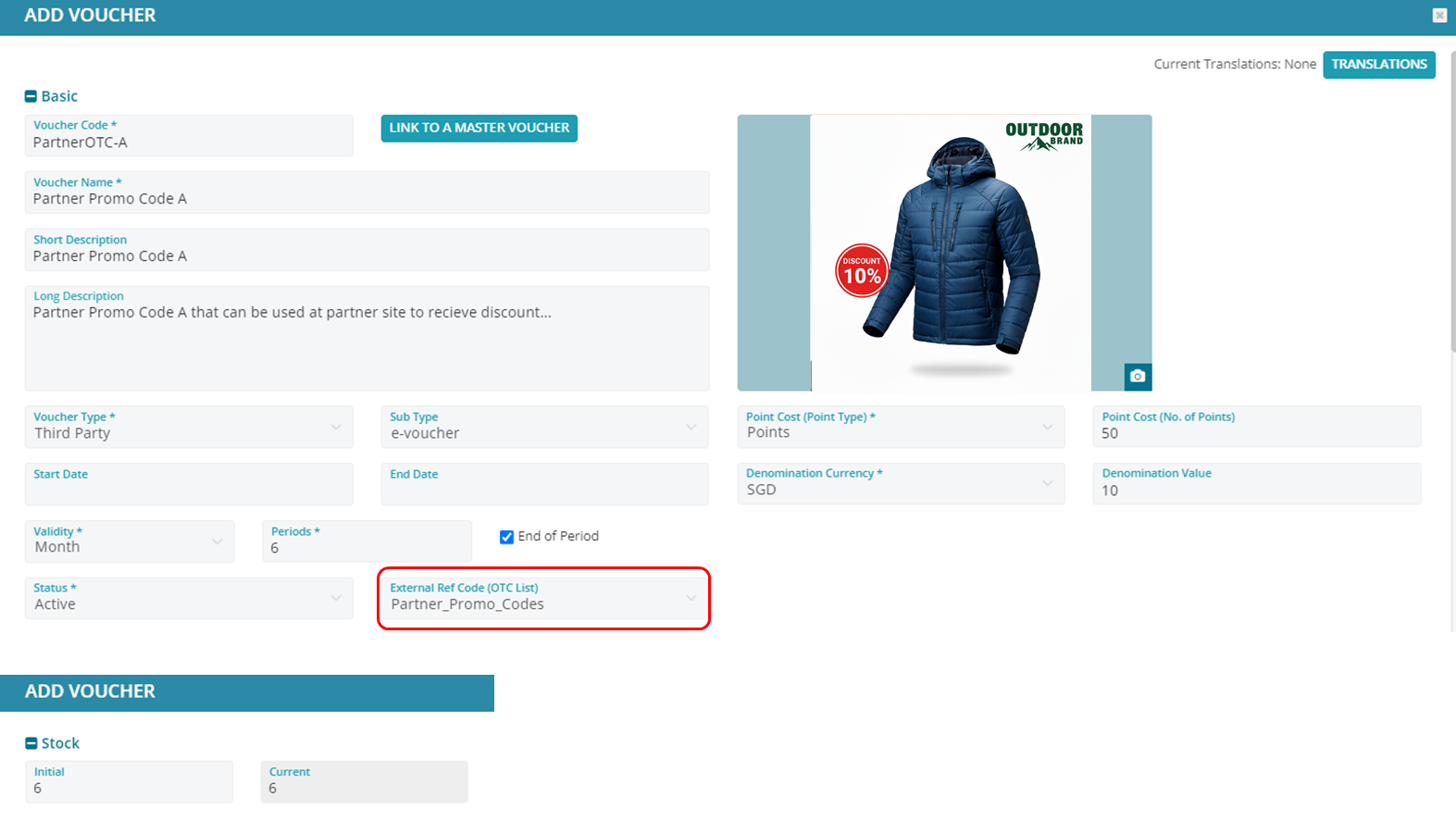
- Under Custom Fields => View Setting ensure the field “Show Reference Number” is defined as “Yes”. This will ensure that the voucher once redeemed in the Mobile App displays the reference number that contains the OTC for the user to use. Also it is recommended to set the Voucher Category to Partner (or Event).
- Note: in the How to Use section ensure that it is clear how the voucher should be utilized at the third party site. And also if there is a particular redemption restrictions set that appropriately in the “Redemption Restrictions” sections.
#4 - User redeems the Voucher in the Mobile App, Access the Partner Promo Code and Uses at Partner Site
The member can view the voucher and take the partner promo code and use the partner promo code online or instore depending on each partner and what the promotions was for, example below.
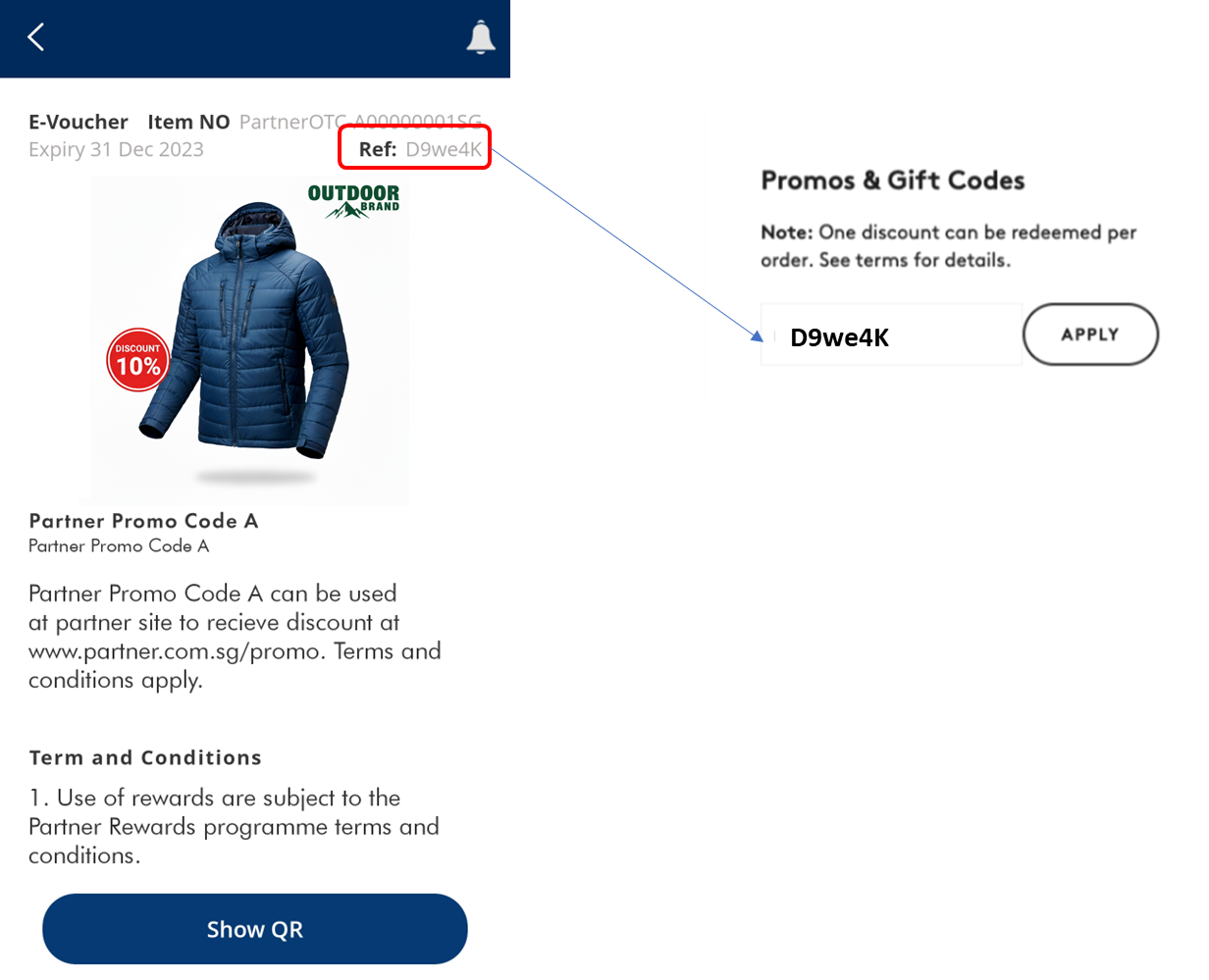
The member could also generate the QR (“Show QR”) which will display the QR code (and reference number), if the third-party partner scans QR codes to redeem the promo codes. There are many different options available.
